



TL;DR
- AI in construction refers to software that learns from project data to predict, sort, and automate work that people used to do by hand.
- AI logs leads, drafts follow-ups, and speeds up cost estimation, which is where most contractors adopt it first.
- Machine learning reads historical data to forecast delays, flag risks, and check drawings before work starts.
- Computer vision and drones track job progress, monitor worker safety, and predict equipment maintenance.
- Followup CRM uses Gregg AI Assist to handle data entry and drafting inside a construction-specific CRM.
What Is AI in Construction?
AI in construction refers to computer systems that learn from data and use what they learn to predict outcomes, sort information, or complete tasks with little human input.
It is not one product. It is a group of AI technologies that show up inside construction software you may already use.
Four types matter most for contractors:
- Machine learning studies historical data from past projects to identify patterns. It can predict which bids you are likely to win or which jobs tend to run over budget.
- Computer vision reads images and video. AI-powered cameras and drones use it to check job progress and spot missing safety gear.
- Natural language processing works with text and speech. It lets you dictate a site note, summarize an email thread, or pull key terms out of a spec.
- Predictive analytics combines the other three to forecast costs, delays, and equipment failures before they happen.
Robotics gets the headlines, but most AI in the construction industry today is quieter than that. It lives in dashboards, inboxes, and mobile apps, doing repetitive tasks so project managers and estimators can focus on decisions.
The AGC survey found the most common use is office and administrative work, which fits that picture.
How AI Is Used in Preconstruction and Sales
The work that happens before construction begins decides whether a project is profitable, or whether it happens at all. Leads, bids, estimates, and proposals all run on data entry and follow-up, and that is exactly the kind of repetitive work AI handles well.
It is also where the AGC survey shows contractors adopting AI fastest, with estimating and preconstruction close behind office tasks.
Lead and Bid Tracking
Most lost bids die from silence, not from a bad price. A salesperson forgets to call back, a due date slips past, and the opportunity goes to a competitor who stayed in touch.
A construction-specific customer relationship management (CRM) platform fixes the tracking problem, and AI removes the friction that stops people from using it.
Followup CRM shows how this works in practice. Its Voice AI lets a contractor say what happened after a site visit or a call, and the system converts the spoken update into CRM information for the user to review.
Gregg AI Assist, a built-in writing helper, drafts follow-up reminders, status updates, and client emails from the context already on the record, with tone options for internal or client-facing messages. The user reviews and sends. Nothing goes out automatically.
The result is a pipeline that stays current without anyone typing notes at 9 p.m. That matters because construction sales management only works when the data behind the pipeline is accurate, and accurate data depends on people actually logging their activity.
Estimating, Proposals, and Follow-Up
Cost estimation is the second most common AI use case among contractors, and it splits into two jobs.
The first is the takeoff. Machine learning tools read drawings, count fixtures, measure areas, and quantify materials in minutes, then compare the results with unit costs from past projects to produce more accurate cost estimates.
The second job is managing the estimate once it exists. An estimate that sits in an inbox without a follow-up is worth nothing, so the sales side needs its own tracking. In Followup CRM, each opportunity moves from lead to bid to proposal in one pipeline.
The proposal generator builds a branded document and sends it for e-signature, and reminders trigger the next touch at the right time.
For contractors who run estimates in project management tools, the handoff matters too.
Followup CRM pushes a lead to Procore Bid Board, where the estimate is built, and syncs the estimate fields back as read-only data. On award, the project name, number, address, contacts, and documents push to a Procore Standard Project without re-entry.
That kind of link between construction bid management software and the field tools is where AI-powered systems save the most time.
How AI Is Used in Project Planning
Once a job is awarded, the same historical data that helped win it becomes the input for planning it. AI planning tools work from the schedules, budgets, and outcomes of past projects to give project managers a more realistic starting point than a blank template.
Scheduling and Risk Prediction
Project scheduling has always relied on experience. An AI scheduling tool adds a second opinion built on data.
It compares the planned sequence with how similar projects actually went, then flags tasks that tend to slip, trades that often clash, and phases that run long in certain seasons.
When conditions change, the software recalculates. A late steel delivery or a week of rain gets fed into the model, and it adjusts the project timeline and suggests mitigation strategies, such as resequencing trades or adding a second crew.
Predictive analytics can also predict potential delays before they show up on site, which gives project teams time to act instead of react.
Resource allocation works the same way. AI systems look at crew availability, equipment location, and workload on other jobs, then recommend where people and machines should go.
Optimizing resource allocation this way reduces idle time and rental costs, two of the quietest sources of cost overruns.
Design and Document Review
Construction projects generate thousands of pages of drawings, specs, contracts, and change orders. Reading all of it is slow, and missing one clause can cost more than the software would.
AI handles this in two ways. First, natural language processing reads documents and answers questions about them. A project manager can ask what the spec says about a specific material or which submittals are due this month, and get an answer with the source page.
The same tools compare drawing revisions and addenda, then list what changed so nobody works from an outdated set.
Second, AI review tools check designs for conflicts before crews arrive. When a building information modeling (BIM) file is available, machine learning algorithms can spot clashes between mechanical, electrical, and structural elements and flag them for the design team.
Catching a duct that runs through a beam on screen is far cheaper than catching it in the field.
For specialty contractors, the practical value is scope clarity. Faster spec review means fewer surprises after the bid, tighter proposals, and a cleaner handoff from sales to the crew doing the work.
How AI Is Used on the Job Site
Job sites produce more data than any office does, from camera footage and drone flights to sensor readings on machines. AI turns that raw feed into alerts, progress reports, and maintenance schedules that construction teams can act on the same day.
Safety Monitoring
Construction safety is where AI has the clearest human payoff. Computer vision systems watch camera feeds and detect potential safety hazards in real time, such as a worker without a hard hat, a person inside an equipment swing radius, or an unsecured edge.
When the system spots a problem, it alerts a supervisor, who steps in immediately instead of learning about it in an incident report.
The same approach works over time, not just in the moment.
AI reviews near-miss reports, inspection logs, and site photos to identify patterns, like a specific subcontractor or work phase that keeps producing violations. Safety managers use that analysis to target toolbox talks and inspections where the risk actually is.
None of this replaces a competent safety culture. The software watches everything at once, which no human can, but people still decide what to change. Firms that treat AI as an extra set of eyes for worker safety, rather than a surveillance tool, tend to get better buy-in from crews.
Progress Tracking and Quality Control
Progress reporting is one of the most manual habits left in construction. Someone walks the site, takes photos, and writes a summary that is already outdated by the time it lands in an inbox.
AI-powered drones and 360-degree cameras supplement site walks by creating a dated visual record. They capture the site on a schedule, and computer vision compares the images with the model and the schedule to calculate how much work is actually complete.
Project managers see job progress by area and trade, and the software flags slowdowns early, while there is still time to fix the cause instead of the symptom.
Quality control runs on the same imagery. AI algorithms compare installed work with the drawings and spot deviations, such as misplaced sleeves, missing blocking, or finish defects.
Catching those before the next trade covers them up avoids the most expensive kind of rework, the kind hidden behind a finished wall.
The honest caveat is that this class of tools fits mid-size and large projects best. Flying drones over a two-day service job makes no sense. But for longer builds with many trades, automated progress tracking gives project teams a shared visual record of completed work.
Equipment and Predictive Maintenance
A machine that breaks mid-pour does not just cost a repair bill. It stalls every trade scheduled behind it. Predictive maintenance exists to prevent that moment.
Sensors on equipment track vibration, temperature, fluid pressure, and fuel use. Machine learning models establish a baseline for each machine, and when readings drift from that baseline, the system tells the shop to service the machine before it fails.
This approach reduces downtime, extends equipment life, and turns maintenance from a calendar guess into a data decision.
Predictive maintenance tools also help with fleet decisions. Usage data shows which machines sit idle, which are near the end of their economic life, and whether renting would beat owning for a given class of equipment.
For firms with a large fleet, those answers are worth more than the repair savings.
The same idea extends past the fleet. Contractors who maintain what they build can apply AI to building systems, where sensor data flags failing HVAC components and supports energy efficiency tuning after handover.
It is an overview-level point for most specialty trades, but it shows how far the predict-and-prevent pattern reaches.
Benefits of AI in Construction
The use cases above share a pattern. AI does not replace human expertise. It removes the manual work that keeps experts from using their judgment. That pattern produces a few concrete benefits.
- Fewer missed opportunities: Automated logging and reminders keep every lead and bid moving. A shared digital bid calendar already keeps due dates visible, and AI adds the layer that fills in the data and prompts the follow-up.
- More accurate estimates: Models trained on past projects catch quantities and cost drivers that a rushed manual takeoff misses, which protects margin on the jobs you win.
- Earlier warnings: Whether the risk is a schedule slip, a safety hazard, or a failing hydraulic pump, AI surfaces problems while they are still cheap to fix.
- Better decision-making: Leadership sees pipeline, progress, and performance in real time instead of waiting for month-end reports, so decisions rest on current numbers.
- Less wasted time: Automating repetitive tasks like data entry, document search, and progress reports gives hours back to the people running the work. In an industry short on skilled labor, operational efficiency is often the difference between growing and turning work away.
Challenges of Adopting Construction AI
The AGC numbers show a gap between interest and daily use, and the reasons are practical rather than technical.
- Messy data: Machine learning is only as good as the records it learns from. If bid histories live in one spreadsheet per estimator and job costs sit in a system nobody reconciles, AI has nothing reliable to work with. Most firms need to clean up data habits before any tool pays off.
- Cost and unclear returns: Construction firms run on thin margins, and some AI tools carry enterprise pricing. The fix is to start where returns are easy to measure, such as hours saved on data entry or follow-up rates on bids, rather than betting on a site-wide rollout.
- Trust and adoption: Crews and salespeople have watched software come and go. If a tool adds steps to their day, they will work around it, and the data gap returns. Tools that remove steps, like speaking an update instead of typing one, get used.
- Skills and oversight: AI output still needs review. An estimate, a schedule, or a drafted email is a starting point, and construction leaders who set that expectation early avoid both blind trust and blanket rejection.
How to Start Using Artificial Intelligence in Your Construction Business
You do not need a data scientist or a big budget to adopt AI. You need a sequence. These four steps keep the first project small and the results measurable.
Clean Up Your Data First
Pick one system of record for each type of information, such as leads, estimates, and job costs, and get the team logging into it consistently. Even a month of clean, current data gives AI tools something real to work with, and the habit pays off regardless of which software you buy.
Pick One Workflow
Choose a single painful, repetitive process. For most contractors, that is bid follow-up, estimating, or progress reporting. Define what success looks like in numbers, such as follow-up rate or hours saved per week, so you can judge the tool honestly after 90 days.
Choose Tools Built for Construction
General AI tools may understand construction terms, but they do not automatically have access to your project data, company procedures, or connected systems. Construction software with built-in AI features fits your existing workflow instead of adding a new one, and it keeps the learning curve short for the team.
Train the Team and Measure
Show the team what the tool does for them, not just how it works. Review the numbers you defined, keep what worked, and drop what did not. One visible win, like a salesperson closing a bid because a reminder fired at the right time, does more for adoption than any mandate.
Apply AI to Construction Sales With Followup CRM
The fastest way to see what AI can do for a construction business is not a robot or a drone. It is a sales pipeline that updates itself.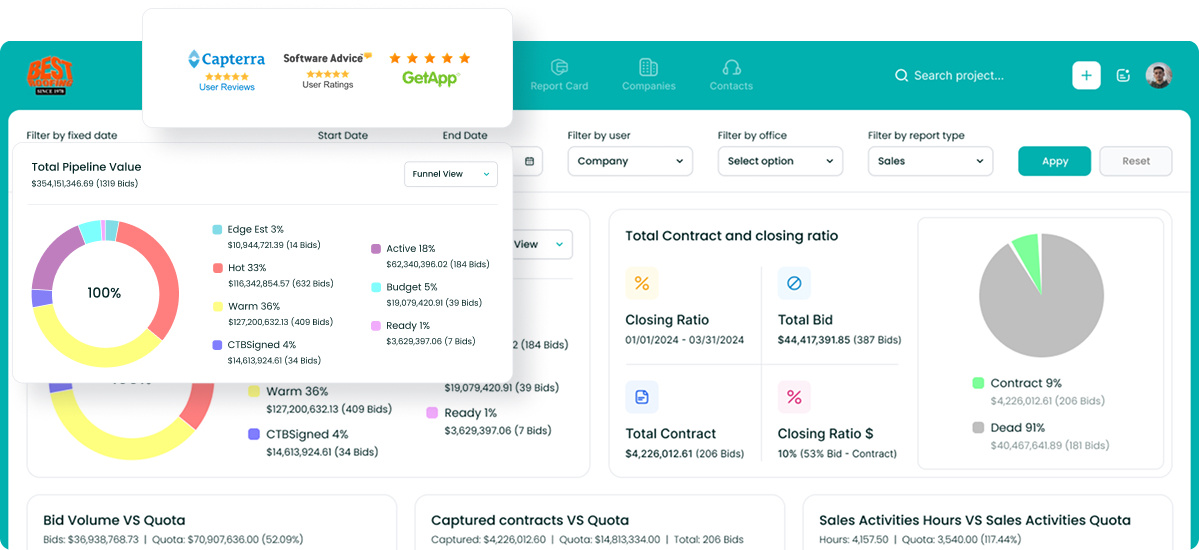
Followup CRM focuses on the sales and pre-award phase, where contractors manage leads, bids, deadlines, proposals, and follow-up activity.
Its AI features support CRM record updates and sales-related drafting within the existing workflow. This gives contractors a defined starting point for AI adoption without changing every part of their construction operations at once.
The AI layer removes the reason most CRMs fail. Voice AI lets your team say what happened and skips the typing. Gregg AI Assist drafts the follow-up emails and status notes. Your bids, deadlines, and dashboards stay current because keeping them current no longer takes effort.
See how it fits the way your team already sells. Book a demo.
FAQs About How Is AI Used in Construction
What is the 30% rule for AI?
The 30% rule is a common guideline that says AI should handle roughly 30% of a task, the repetitive part, while people keep the other 70%, the judgment.
Applied to the construction process, AI-powered tools log data, draft documents, and analyze project data, while estimators and project managers make the decisions.
Followup CRM works on the same split. Voice AI and Gregg AI Assist prepare the entry or the draft, and the user reviews and sends.
Is construction going to be replaced by AI?
No. Building depends on physical skill and field judgment that software does not have. AI-powered robots exist for narrow jobs like layout printing and bricklaying, but construction workers stay at the center of the project lifecycle.
The realistic shift is that new technologies absorb the paperwork, so crews and construction companies spend more of their day building.
Which industry will gain the most from AI?
The construction sector has more room to gain than most because much of it still runs on traditional methods like spreadsheets and manual reports.
Construction operations generate enormous data from construction sites, and firms that use it to predict maintenance, prevent project delays, and improve efficiency will outpace those that do not.
Can ChatGPT do construction takeoffs?
Not reliably. General AI-powered technology can summarize a spec, but a takeoff needs software that measures drawings and recognizes beams, ducts, and other structural elements.
Purpose-built construction estimating tools handle that job, and they work best paired with a CRM that tracks every estimate through to a signed contract.
The CRM Built For Construction Companies
No more disorganized data. Track your leads, bids, and customers all in one place.
Seamless Integration with:
✅ Foundation ✅ Viewpoint ✅ Sage and more

.png)


-Feb-13-2025-07-52-40-3010-PM.webp)