



TL;DR
- Bluebeam is specialized software for PDF markup, drawing review, and quantity takeoffs, built for professionals in architecture, engineering, and construction.
- Procore is a comprehensive project management platform that covers budgets, RFIs, submittals, scheduling, safety management, and field operations.
- Bluebeam uses tiered per-seat pricing. Procore prices custom quotes based on annual construction volume.
- Estimators, document controllers, and design teams tend to prefer Bluebeam. Project managers and general contractors running complex projects tend to prefer Procore.
- Neither tool manages your sales pipeline before the project starts. Followup CRM tracks leads, bids, and follow-ups, then pushes won work directly into Procore.
What Is Bluebeam?

Image source: bluebeam.com
Bluebeam is document management and markup software built for architecture, engineering, and construction professionals. Its core strength is the way it handles PDF drawings.
Users can mark up plans, compare drawing revisions, add custom stamps, and measure length, area, and volume directly on the page.
Bluebeam Studio is the collaboration layer. Studio Sessions let multiple team members review and comment on the same documents in real time, with every markup tracked by author, date, and time.
That audit trail makes it a favorite for document controllers who need clean version control during design review and submittal preparation.
The program also functions as capable estimating software for takeoff work. Estimators use their measurement tools to pull quantities from drawings quickly, which is why they show up in so many preconstruction departments.
What Bluebeam does not do is manage the broader project. There is no budget module, no scheduling engine, and no daily log function. It is a deep, focused tool for teams whose work lives inside plans and documentation.
What Is Procore?

Image source: procore.com
Procore is construction project management software designed to run the entire job from one platform.
Where Bluebeam focuses on documents, Procore connects every part of project execution:
- Budgets and financials
- RFIs
- Submittals
- Change orders
- Scheduling
- Quality and safety management
- Communication between the office and the site
Field teams use the mobile app to file daily logs, report safety issues, capture site photos, and check current drawings from anywhere. Version control is automatic, so everyone on site works from the latest set of plans.
For project managers overseeing complex projects, that single source of project information is the main draw.
Procore also maintains a large integration marketplace. It connects with accounting and ERP systems, estimating software, scheduling tools, and platforms like Autodesk Construction Cloud, which lets teams bring BIM models and design data into their daily operations.
The platform is aimed primarily at general contractors, owners, and larger specialty contractors. Setup takes real effort, and most companies invest in training during rollout, but the payoff is one system holding all project data instead of five disconnected programs.
Bluebeam and Procore: Key Differences
The clearest way to compare Bluebeam and Procore is side by side on the things contractors actually use them for. Here are the six areas where the difference shows up in daily operations.
Document Markup and Drawing Review
This is Bluebeam territory. It offers PDF markup tools that go far deeper than a general PDF editor, such as:
- Custom tool sets
- Overlay comparisons between drawing revisions
- Hyperlinked plan sets
- Measurement tools accurate enough for takeoff work
Bluebeam Studio adds live collaboration, so a review session with the architect, engineer, and estimator can happen in one shared document with every comment logged.
Procore handles documents from an organizational angle. It stores plans, tracks versions, and distributes the current set to field teams automatically.
Its markup capabilities cover basic annotation, which is enough for a superintendent flagging an issue on site, but not for detailed design review or document control work. Teams that need heavy markup usually keep Bluebeam for that task even after adopting Procore.
Project Management Scope
Procore excels here, and it is not close. The platform delivers comprehensive project management: budget tracking, RFIs, submittals, change orders, scheduling, meeting minutes, and daily logs in one connected system.
Project managers can see cost data next to open RFIs next to schedule impacts, which is the entire point of an all-in-one platform.
Bluebeam offers workflow tools for document-centric processes like submittal reviews and punch lists, but it does not attempt full project management. There is no financial module and no scheduling engine.
Companies running Bluebeam alone typically manage budgets and schedules in separate programs.
Mobile and Field Use
Procore's mobile app is built for the site. Field teams file daily logs, report incidents for safety management, capture and tag photos, review specs, and answer RFIs from a phone or tablet.
Everything syncs back to the office in real time, so project information stays current on both ends.
Bluebeam's mobile experience centers on documents. Field users can pull up drawings, add markups, verify measurements, and embed site photos directly into the plan set. It works well for drawing-focused field tasks like punch walks and quality checks.
For broader field reporting, Procore covers more ground.
Integrations
Procore maintains one of the largest integration marketplaces in construction software.
Its integration capabilities span ERP and accounting systems, estimating software, scheduling tools, and design platforms, including Autodesk Construction Cloud for teams that coordinate BIM models alongside execution data.
Bluebeam takes a focused approach. Its integrations concentrate on design and document workflows: CAD and BIM authoring tools, cloud storage services like Dropbox and Box, and, as of late 2025, official integrations with Procore itself.
That partnership matters enough that we cover it in its own section below.
Pricing Structure
The two companies use different pricing models. Bluebeam Revu sells tiered per-seat subscriptions, so a company can buy exactly the number of licenses it needs and predict the cost. It offers the following plans:
- Basics: $260 per user, billed annually
- Core: $330 per user, billed annually
- Complete: $440 per user, billed annually
- Max: $590 per user, billed annually
Procore builds custom quotes based on annual construction volume, which means pricing scales with the size of the business rather than the user count.
Neither model is inherently better. Per-seat pricing is easy to budget for small teams, while volume-based pricing can be cost-effective for companies adding many users. Which option fits depends on team size, project load, and how many people need access.
Learning Curve and Setup
Bluebeam installs like a desktop program and feels familiar to anyone who has used PDF software. Most users handle basic markup within days, though advanced features like custom tool sets and Studio workflows take longer to master.
Procore is a bigger commitment. Because the platform touches budgets, documents, communication, and field operations, companies need to set up permissions, templates, and standard workflows before rollout.
Procore supports this with structured training and certification resources, and most firms plan for a phased implementation. The investment is front-loaded: harder to launch, easier to run once teams are trained.
When Bluebeam Is the Better Fit
Bluebeam makes sense for teams whose daily work revolves around drawings and documentation.
That includes estimators pulling quantities from plan sets, document controllers managing drawing revisions and version control, and design professionals in architecture and engineering who run markup-heavy review cycles.
It is also the practical choice for smaller specialty contractors who need serious document tools without paying for a full platform.
A five-person estimating department can license Bluebeam per seat, get precise takeoff and markup capabilities, and keep managing the rest of the business in the systems they already use.
Companies in this group usually share a profile: their pain point is document handling, not project coordination. If the frustration in your office sounds like "we keep marking up the wrong revision" or "takeoffs are eating our estimators' time," Bluebeam addresses the actual problem.
Buying a good project management platform to fix a document problem adds cost and setup time without touching the bottleneck.
When Procore Is the Better Fit
Procore fits companies whose problem is coordination.
General contractors juggling subcontractors, owners tracking multiple active jobs, and larger specialty contractors with dedicated project managers all get value from having budgets, RFIs, submittals, schedules, and field reports in one system.
The platform earns its keep on complex projects. When a job involves dozens of companies, hundreds of documents, and constant communication between the office and the site, the cost of scattered information grows fast.
Missed RFIs delay work, outdated drawings cause rework, and nobody has a current picture of the budget. Procore exists to close those gaps, and its volume-based pricing reflects that it is built for businesses at that scale.
It is also the stronger option for firms that want field teams working in the same system as the office. Daily logs, safety inspections, photos, and timekeeping flow into the same project record that project managers use for reporting.
For leadership, that means real visibility into daily operations instead of waiting on weekly summaries.
If your team's pain sounds like "we find problems too late" or "every department has its own version of the truth," you are describing the problem Procore was built to solve.
Can You Use Bluebeam and Procore Together?
Yes, and this is where the comparison changes shape. In September 2025, Bluebeam and Procore announced a strategic partnership with two official integrations: Procore Documents + Bluebeam and Procore Submittals + Bluebeam.
The integrations connect Bluebeam's review tools with Procore's project records so teams can run collaborative document reviews without moving files by hand between systems.
The partnership formalized what many contractors were already doing. In practice, plenty of companies use Procore to run the project and Bluebeam to do the detailed document work inside it.
An estimator does takeoffs in Bluebeam, the project team manages submittals in Procore, and the design reviewers mark up drawings in a Studio Session. The new integrations reduce the manual file transfer that used to sit between those steps.
For buyers, the takeaway is that choosing between these two tools is not always an either-or decision. If your company needs both deep markup and full project management, the two programs are designed to work together now.
The budget question becomes whether the combined licensing cost is justified by the work your team does, not which single tool to compromise on.
Efficient Bids and Pipeline Management Starts With Followup CRM
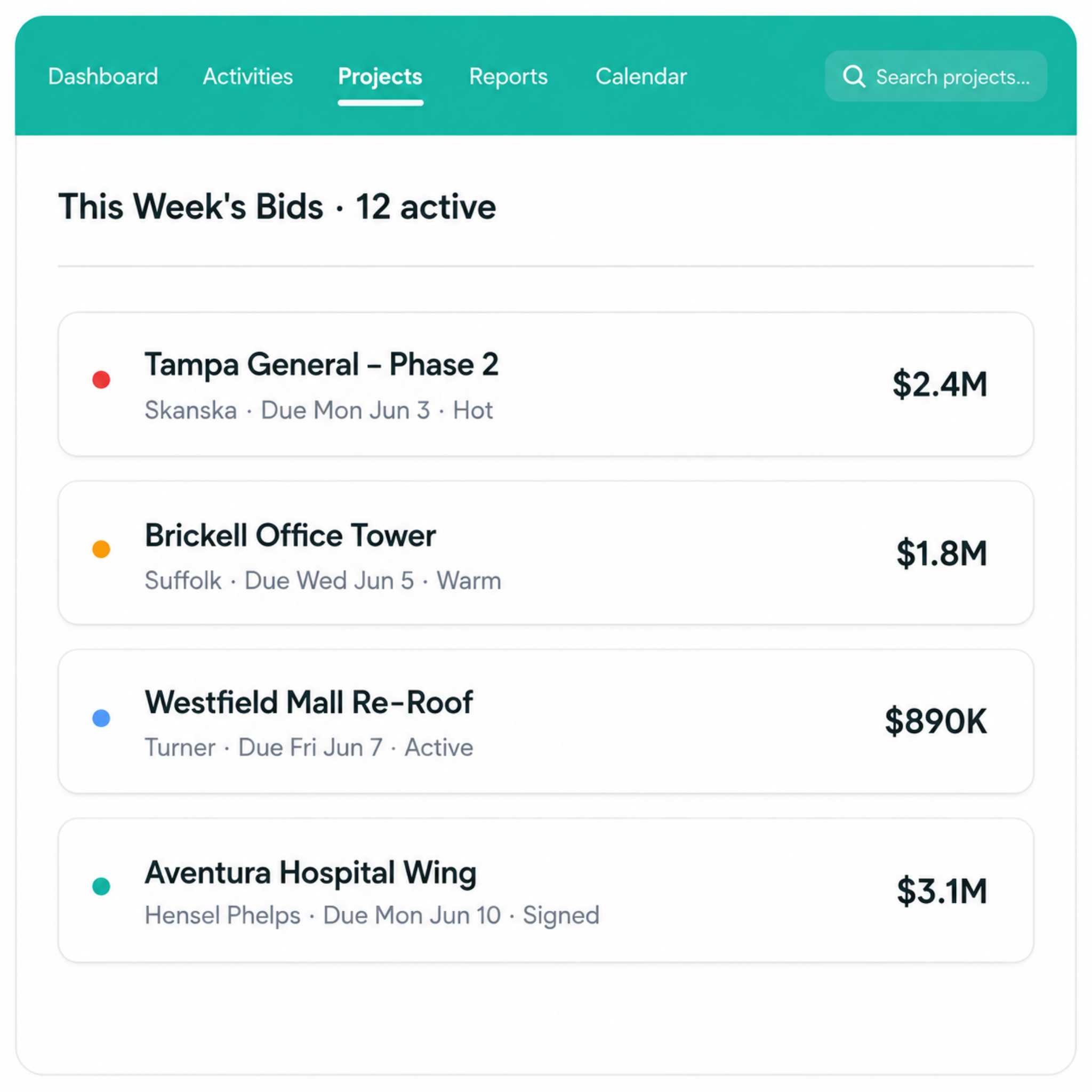
Bluebeam and Procore both start working after you win the job. Neither one tracks the leads, bids, and follow-ups that get you there. That pre-award work is what Followup CRM handles.
Followup CRM is a construction CRM built for commercial and specialty trade contractors. It captures leads, tracks every bid on a digital bid calendar, logs emails and calls against the right deal, and shows leadership a real-time view of the pipeline and close rates.
Teams that used to run sales out of spreadsheets use it to make sure no bid deadline or follow-up slips through.
It also connects directly to Procore. When you push an opportunity from Followup CRM to Procore Bid Board, the job name and number, project address, and contacts transfer automatically.
When you win, the award triggers a Procore Standard Project with the project data and documents already in place. Your estimators run the estimate in Procore, your sales team tracks the proposal in Followup CRM, and nobody types the same project information twice.
FAQs About Bluebeam vs Procore
Is Bluebeam document management software being discontinued?
No. Bluebeam, as a product and company, is active, but its licensing has changed.
Bluebeam Revu 21 moved to an annual subscription model, which is now the only supported path forward, and Revu 20, the last perpetual version, reaches end of support on July 31, 2026, and end of life on December 31, 2026, after which it loses access to Studio and cloud services.
Teams still on Revu 20 need to move to a subscription plan this year. If you are reviewing your software stack anyway, it is a good moment to look at the pre-award side too. Followup CRM keeps your bids and follow-ups organized, no matter which document tool your team lands on.
Is Bluebeam good for estimating?
Bluebeam is a strong takeoff tool. Estimators use their measurement features to pull lengths, areas, and quantities directly from PDF drawings, which speeds up the takeoff stage considerably.
It is not full estimating software, though. It does not build cost databases or generate proposals.
Many contractors pair Bluebeam takeoffs with dedicated estimating programs and then manage the bid itself in Followup CRM, which tracks due dates, proposals, and follow-ups so estimating work actually turns into submitted bids.
Is Procore construction project management software worth the money?
It depends on the size and complexity of your operation. Procore prices by annual construction volume, and companies running multiple complex projects with large teams generally see the value in centralized documents, financials, and field reporting.
Smaller contractors with simpler jobs may not use enough of the platform to justify the investment. Whichever way you decide, the sales side still needs its own system.
Followup CRM tracks leads and bids before Procore takes over, and the two integrate directly, so your pipeline and your projects stay connected.
The CRM Built For Construction Companies
No more disorganized data. Track your leads, bids, and customers all in one place.
Seamless Integration with:
✅ Foundation ✅ Viewpoint ✅ Sage and more


-Feb-13-2025-08-28-41-9829-PM.webp)